
Windows 自動修復失敗修復教學
2026-03-16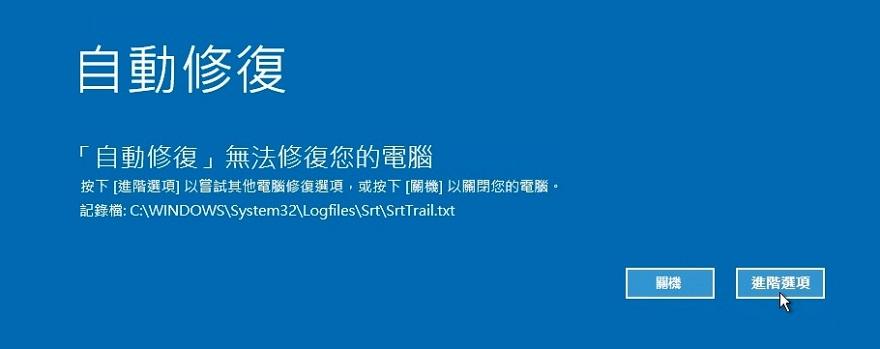
當電腦開機出現 「自動修復無法修復您的電腦」 或一直進入自動修復畫面時,可以透過以下方法嘗試修復系統。
1. 進入 Windows 修復模式
開機出現修復畫面
點選 疑難排解
點選 進階選項
選擇 命令提示字元 (Command Prompt)
2. 確認 Windows 系統磁碟
在命令提示字元輸入以下指令確認系統所在磁碟:
dir C:Windows
dir D:Windows
dir E:Windows
dir D:Windows
dir E:Windows
如果顯示 Windows 資料夾,代表該磁碟為系統磁碟。
3. 執行系統修復指令
依序輸入以下指令:
chkdsk C: /f /r
檢查並修復磁碟錯誤。
sfc /scannow /offbootdir=C: /offwindir=C:Windows
修復 Windows 系統檔案。
bootrec /fixmbr
bootsect /nt60 sys
bootrec /fixboot
bootrec /scanos
bootrec /rebuildbcd
bootsect /nt60 sys
bootrec /fixboot
bootrec /scanos
bootrec /rebuildbcd
修復 Windows 開機資料。
最後輸入:
bcdboot C:Windows /l zh-tw /f ALL
重新建立開機環境。
4. 重新啟動電腦
輸入以下指令並重新開機:
exit